The app
Every module on one page, and what needs you on one line.
What's inside
Four jobs every product has after launch. One app that does them.
Shipping is the start. Then people have to hear about it, find it, be able to use it and trust it. Startica is built as four modules, one for each, that share your products, your sites and one daily list.
-
Marketing
Reach people
Finds the conversations where people describe the problem you solve, drafts replies and posts in your voice, plans small ad tests, and tells you what brought visits, signups and revenue.
- Inbox: threads from Reddit, Hacker News, Bluesky, Mastodon, Discourse and X, scored and drafted
- Content Studio: posts, articles, newsletters and email campaigns in a voice you pick
- Ads: plans, copy and images for Google, Meta and Reddit that you launch yourself
- Analytics: GA4 or Umami, Stripe and your own database, traced back to each post
-
SEO & GEO
Get found
Checks what search engines, AI assistants and AI agents need from your site, shows how you do in Google and Bing, and asks AI assistants your customers' questions to see if they recommend you.
- Site health: titles, indexing, broken links, structured data, AI crawler access
- Search: queries, clicks and positions from Search Console and Bing
- AI visibility: whether assistants mention you, and who they name instead
- Opportunities, agent readiness, and the sites AI answers cite
-
Accessibility
Work for everyone
Crawls your site in a real browser, checks every page against WCAG 2.2 with axe-core, groups the same problem across pages so you fix it once, and puts the worst first.
- Issues ranked by impact and reach, with highlights on the page
- Alt text review and fix suggestions written for your actual HTML
- Links, spelling, readability and the PDFs your pages link to
- A checklist for what automation can't decide, a statement and an ACR draft
-
Security
Stay safe
Once you prove a site is yours, checks what anyone on the internet can see: HTTPS, headers, cookies, exposed files and email spoofing. Then it keeps watching.
- Findings with how to fix them, a score, and a recheck when you're done
- Monitoring: new subdomains, expiring certificates, look-alike domains
- Known-vulnerable libraries, ranked by how likely they are to be exploited
- A security.txt, a disclosure policy and an inbox for reported problems
How it fits together
One place to start each day, and twenty minutes of the right work.
The modules feed each other. Intel shapes what the Inbox looks for, Intel's keywords shape the ads, a security finding can land on the Roadmap, and everything worth doing today lands on one list.
-
01
Dashboard
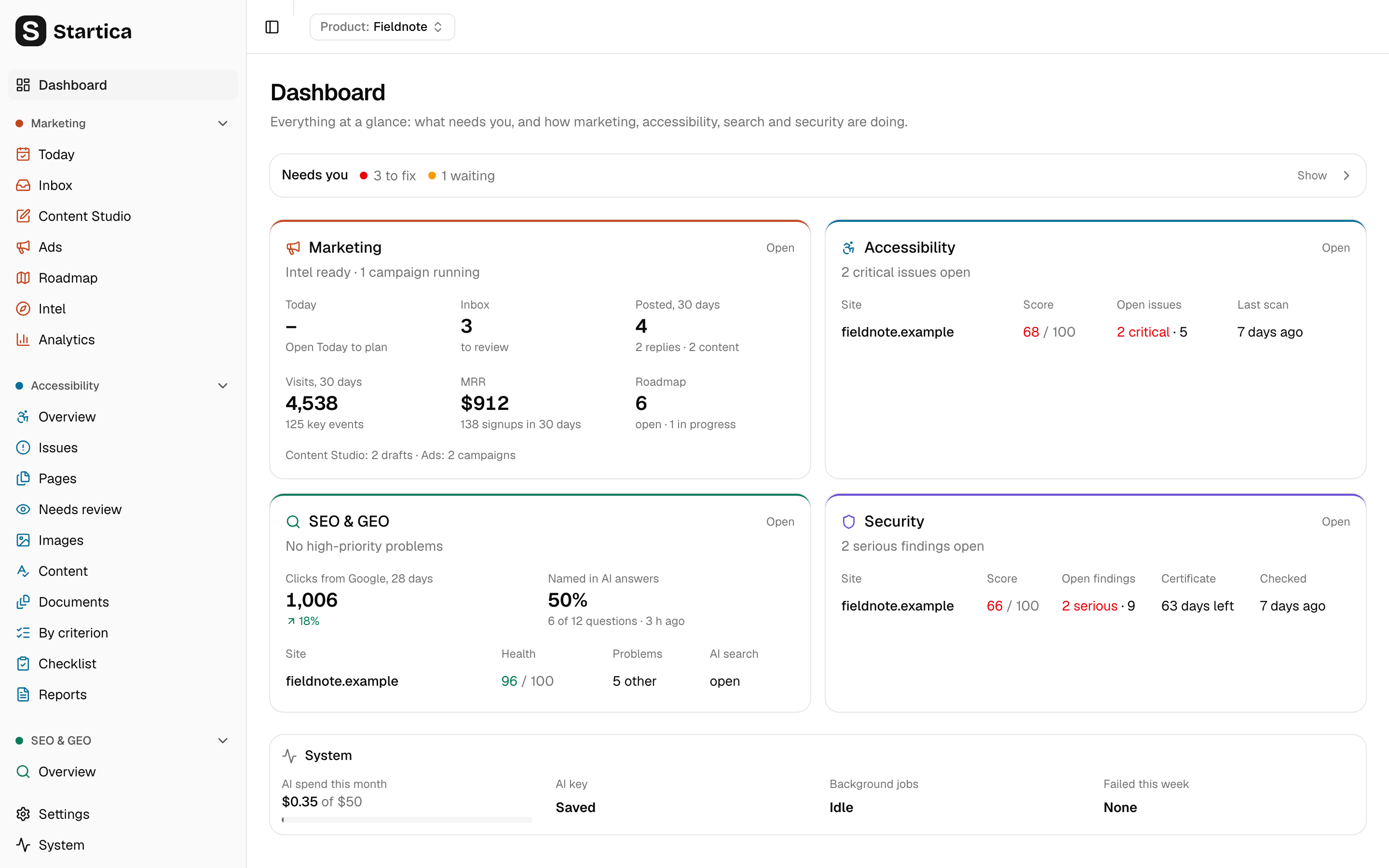
Opens on what needs you across every module, broken or risky things first, then each module's numbers for the product you're working on.
Read the guide -
02
Today
Up to seven ranked moves for the day, from drafted replies to a serious security finding. Built from rules, so it's instant and free.
Read the guide -
03
Roadmap
Growth bets across the funnel, each with a playbook and a success metric. Re-planned every week from what worked, and any finding can join it.
Read the guide -
04
One scan
Each page of your site is loaded once, and the accessibility, search and security checks all run on it. Problems can go straight to GitHub or GitLab issues.
Read the guide
Principles
Your data, your keys, your call.
-
Local-first
Everything lives in one SQLite file on your computer. No account, no Startica server, no telemetry.
-
Bring your own keys
Your Claude or OpenAI key, your Google, Stripe and database connections. Secrets are encrypted with your OS keychain.
-
Spend you control
Scans and checks are free. AI is opt-in per task, under a monthly budget you set, and every call is logged with its cost.
-
Nothing goes out without you
Startica can fill in a reply, but you press the site's own button. You launch the ads. You change your site. It never acts for you.
-
Honest about what it checks
It reports what automated checks found and what still needs a person. It never calls your site compliant, certified or secure.
-
Plays by the rules
Public feeds and official APIs, no scraping. It scans only sites you own, politely, and runs security checks only after you prove it.
Exactly what leaves your computer, and when: read the privacy page.
Under the hood
A desktop app with a small web server inside.
The Electron window talks to a Next.js server running only on your machine, behind a token that changes every launch. Background jobs scan, check, score, draft and sync on a schedule while the app sits in your menu bar or tray. Site scans load each page once in Electron's own Chromium. AI runs only in jobs, through one logged path with a budget guard.
- Electron desktop shell
- Next.js 16 UI and server
- SQLite node:sqlite + Drizzle
- Claude or OpenAI a model per task
- axe-core accessibility checks
- TypeScript strict, end to end
Your computer
Startica window
Electron, sandboxed
OS keychain
encrypts secrets
Local server
pages · jobs · site scans
startica.db SQLite
Open source
Built in the open. Shaped by the people who use it.
Startica is MIT licensed. Read every line, fork it for your own business, or help build it: add a channel, a connector, a check or a playbook; fix a bug; improve the docs. Big ideas start in Discussions.
Hosted version
Rather not run it yourself?
Startica is built to run on your own computer. If you'd rather have a hosted version, with Startica running somewhere you don't have to look after, get in touch and tell us about your setup.
Why a “startup harness”?
A harness puts power to work while you hold the reins. Startica wraps your own AI model, Claude or OpenAI with your key, in the research, background jobs, playbooks and checks that the work after launch needs. The AI does the legwork; you approve every move.
Is Startica free?
Yes. The app is free and open source under the MIT license. Scans and checks cost nothing. You pay only for the APIs you choose to use, mainly Claude or OpenAI, under a monthly budget you set.
Who is it for?
Founders and small teams who look after their own product: no marketing department, no accessibility consultant, no security team. It's a single-user app with no logins or sync.
Does it post or change anything for me?
No. On supported sites, Startica opens the page, fills in your reply and waits for you to press the site's own button. Ads are files you import and launch yourself. Fixes for your site are suggestions to copy. It never sends email.
Will it make my site compliant or secure?
It will find a lot of real problems and help you fix them, but no automated tool can promise that. Startica shows what still needs a person to review, and never calls a site compliant, certified or secure.
Can I scan any website?
Only sites you own or are allowed to test. Startica asks you to confirm that when you add a site, crawls politely, and runs its security checks only after you prove ownership with a DNS record, a file or Search Console.
Where does my data go?
It stays in a SQLite file on your computer. Startica sends prompts to Claude or OpenAI with your key, reads public feeds, loads the sites you scan, and calls Google, Stripe, your database or a few free public security services only for features you turn on. The privacy page lists every one.
How do I install it?
For now you clone the repository and run it, or build an installer for your own machine with one command. Signed installers with automatic updates are coming to GitHub Releases.
Can I try it without an API key?
Yes. On the welcome screen, choose “Look around with a sample product first”. Startica opens a fictional product with sample results in every module, with scans, AI and posting turned off. Your own data stays separate.
Get Startica running in about ten minutes.
You need Node 24, git and a Claude or OpenAI key. A short setup takes you from there, or you can look around with a sample product first.